How to Use Codex: Getting Started, 5 Tips, and Best Practices


Codex is OpenAI's coding agent. It reads your code, edits files, runs commands, and reviews the result — which means the real question is not "how do I install it" but "what do I hand it, and where do I stay in the loop."
Install and first run take one block:
npm i -g @openai/codex
codex
Authenticate with your ChatGPT account or an API key on first run. Then make your first prompt investigation-only, not a build request.
The 5 Codex tips that matter most
If you only take five things from this page, take these. Each links to the detailed version below.
| # | Tip | What it means in practice |
|---|---|---|
| 1 | Ask for a plan before implementation | Change the first line from "implement this" to "show me the plan in 3 steps first" |
| 2 | Write scope and non-goals in every task | State what to touch, what to achieve, and explicitly what not to touch |
| 3 | Move repo-wide rules into AGENTS.md | Stop repeating build commands and conventions in every prompt |
| 4 | Delegate separable work to subagents | Split a PR review by lens — security, bugs, tests, maintainability — then merge |
| 5 | Always end with review or tests | An unverified diff is a draft, not a change |
The thread running through all five: Codex gets more reliable as you make the boundaries more explicit. Vague asks do not fail loudly, they fail as churn — broad diffs, unrelated formatting, and edits you cannot defend in review.
Quick answer: CLI, App, or IDE extension?
| Goal | Best entry point | What to do |
|---|---|---|
| Try Codex quickly | CLI | Install with npm i -g @openai/codex, run codex, and start with investigation |
| Manage multiple coding tasks | App | Use worktrees, review panes, background tasks, and handoff |
| Stay inside your editor | IDE extension | Use it when your IDE is already the main control surface |
| Work in a large repo | CLI or App + AGENTS.md | Start with repo mapping, focused file targets, and verification commands |
| Repeat the same workflow | Skills | Package the instructions, references, and scripts once |
| Review complex changes | Subagents | Split by review lens, then consolidate findings |
A practical onboarding sequence:
- Start with either CLI or App, not both at once.
- Run 3 small tasks end to end.
- Create or improve
AGENTS.md. - Add one skill for repeatable work.
- Then move into subagents and automation.
Companion reads: Codex vs Claude Code Skills if you are choosing between the two agents, Best Vibe Coding Tools in 2026 for the wider landscape, and Parallel Code Agents if you already know you will run several tasks at once.
- How to Use DeepSeek Harness: Install, Set Up, and Run Your First Agent
- Runcell Science: An Open Source Alternative to Claude Science for Research Workflows
- How to Make Mac Not Sleep: Keep Codex, Claude Code, and AI Agents Running
- OpenClaw vs ZeroClaw vs Pi Agent vs Nanobot: Which AI Agent Stack Should You Choose in 2026?
- Can Claude Code Analyze Jupyter Notebooks for Data Science? What It Actually Does
- Claude Code Routines: Why AI Agent Cron Jobs Matter
- Claude Code Desktop Bypass Permissions: How to Enable It
- How to Build Two Python Agents with Google’s A2A Protocol - Step by Step Tutorial
- Top 10 growing data visualization libraries in Python in 2025
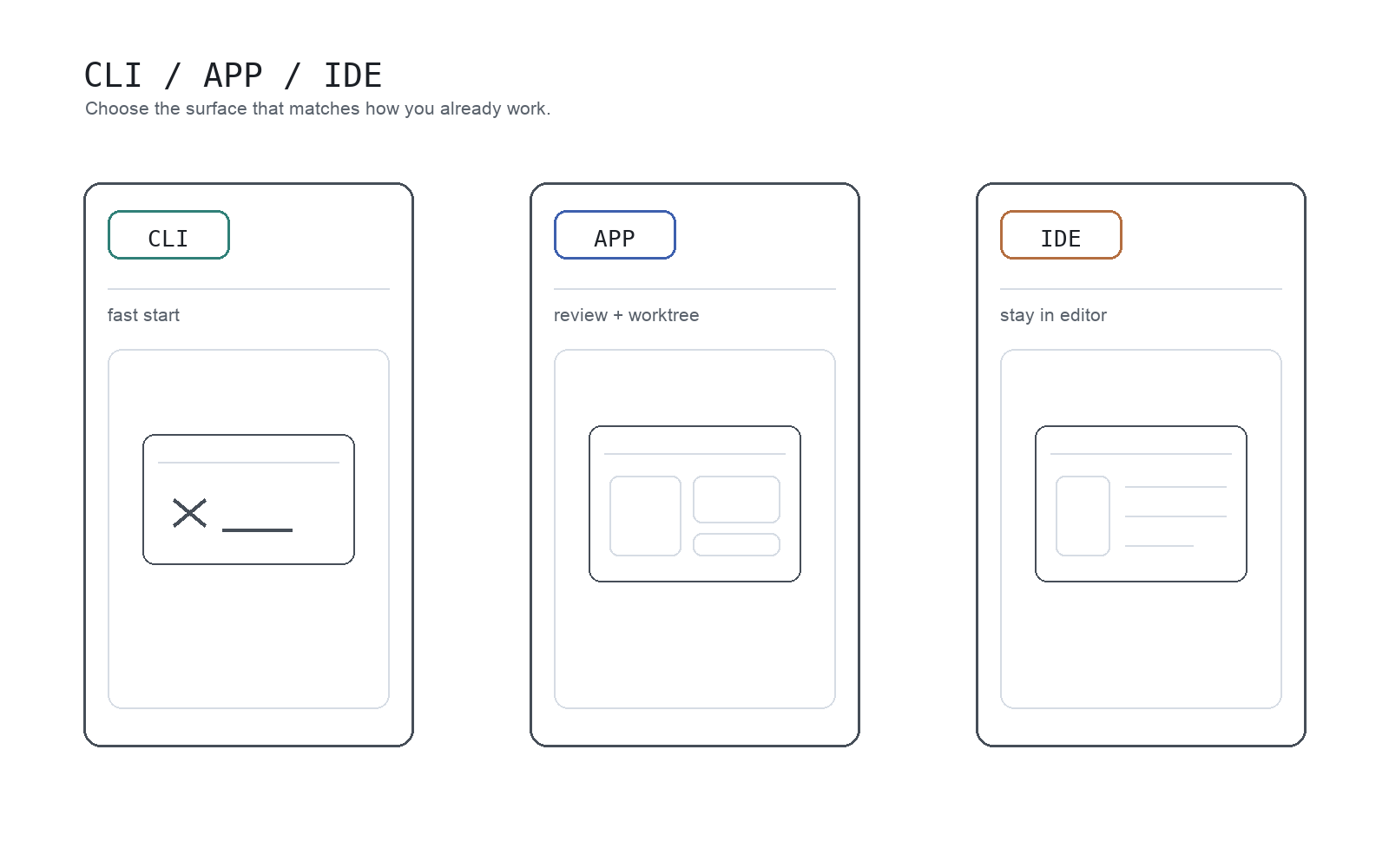
Most teams get stuck on where to begin. CLI is the fastest trial path, App is strongest for review and worktrees, and the IDE extension is easiest when you do not want to change your day-to-day editor flow.
What Codex actually is
Codex is OpenAI's coding agent. In CLI, it can inspect local code, edit files, and run commands. In App, it adds a stronger review layer with worktree-based parallel task handling and background tasks. The IDE extension brings similar capabilities into editor-centric workflows.
The key mindset shift: if you treat Codex as only "a chat that writes code," you will miss most of its value. It is useful for:
- understanding unfamiliar codebases
- shipping small-to-medium changes
- debugging and root-cause investigation
- validating edits with tests, lint, and build commands
- structured code review and diff cleanup
- turning repeated work into skills and automations
So practically, Codex is less "one model output" and more "an agent integrated into engineering workflow."
Getting started with Codex
1. Install CLI and run your first session
The official Codex CLI quick start is:
npm i -g @openai/codex
codex
On first run, authenticate with your ChatGPT account or API key. The practical rule is simple: do not start with a huge task. First run should be low-risk exploration.
For example:
Summarize this repository structure and development flow.
Do not edit anything yet; investigation only.
This shows how Codex parses your repo and how much detail it naturally returns.
2. Use your second prompt for a tiny, reviewable edit
Your second task should be intentionally narrow:
Update only the copy in this component.
Limit changes to one file and summarize the diff after editing.
Codex can handle broad asks, but constrained asks are more stable early on.
3. Use your third prompt to include verification
Codex is most valuable when it does not stop at editing:
Fix this failing test.
After the patch, run only related tests and summarize what changed in 3 lines.
That "edit plus verification" pattern is the core habit to build.
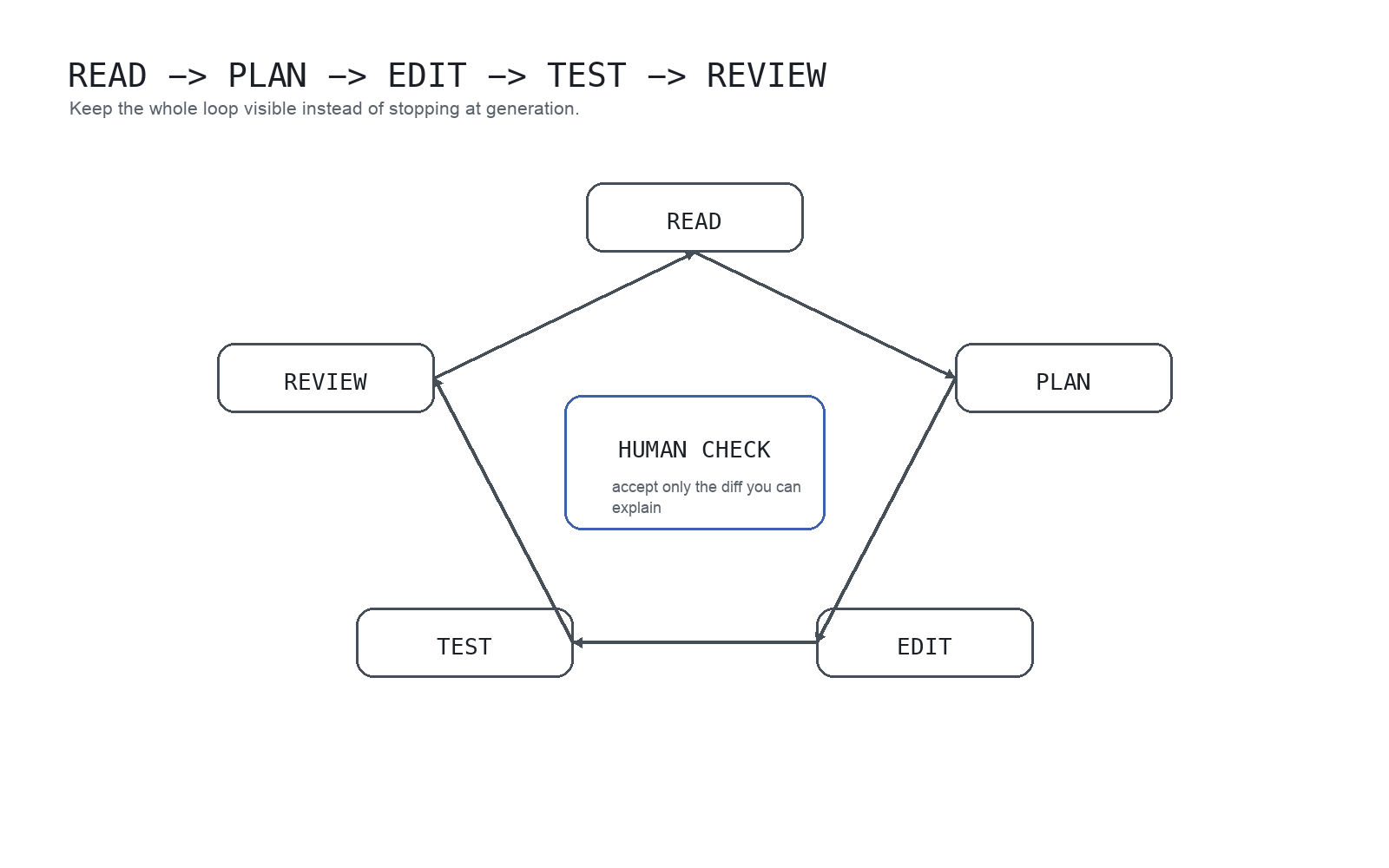
Reliability improves when you keep Codex in a read -> plan -> edit -> test -> review loop. The human check in the center matters: only accept changes you can explain and defend.
Using Codex CLI in a large repo
Large repositories are where Codex can help most, but they are also where vague prompts fail fastest. Do not ask Codex to "understand the whole repo" and then immediately edit. Ask for a map, constrain the search area, and make verification explicit.
| Large-repo problem | Better Codex request |
|---|---|
| You do not know where to start | Map the repo structure, identify the app entrypoints, and list the commands for tests and lint. Do not edit. |
| You need one bug fixed | Investigate this bug. Limit the search to auth and routing unless evidence points elsewhere. Show the plan before editing. |
| You are worried about broad churn | Change only the files needed for this behavior. Avoid unrelated formatting and summarize every touched file. |
| You need confidence after edits | Run the smallest relevant test command. If tests are unavailable, explain the manual verification path. |
For large repos, AGENTS.md is not optional housekeeping. It is how you keep Codex from rediscovering your project rules every time.
AGENTS.md vs skills vs subagents
These three pieces solve different problems.
| Tooling | Use it for | Do not use it for |
|---|---|---|
AGENTS.md | Durable repo instructions, command order, coding conventions, and review expectations | Long manuals that should live in deeper docs |
| Skills | Repeatable workflows such as release checks, doc publishing, code review, or data QA | One-off task instructions |
| Subagents | Parallel research, multi-lens review, and separable analysis | Tightly coupled edits that need one focused thread |
Good AGENTS.md files stay short and point to deeper sources. Put the map in AGENTS.md; put the full policy or playbook in docs or skills.
Core usage patterns
Ask for understanding before asking for changes
For existing repos, this usually improves quality:
Summarize this module's responsibilities and dependencies.
Then propose two minimal change options.
Do not edit yet.
One extra turn to validate understanding is cheaper than cleaning up a wrong patch.
Always define done criteria
Codex output is more consistent when completion is explicit.
Weak prompt:
Improve this page.Stronger prompt:
Shorten the introduction on this page.
Make the first screen answer both "what is this?" and "why does it matter?"
Keep the current H2 structure and do not add code blocks.
Treat diffs as review artifacts, not auto-accept output
In App, the review pane lets you inspect both Codex edits and other unstaged local changes, with staged/unstaged control and inline comments. That enables tighter feedback than generic "please fix this."
If you use App heavily, Parallel Code Agents is the right next read because it maps directly to Codex worktree and review behavior.
The 5 Codex tips in detail
Tip 1: ask for a plan before implementation
Changing your first line from "implement this" to "show me the plan first" cuts unnecessary churn.
Example:
Show the fix plan in 3 steps first.
Then proceed with implementation.
This works across bug fixes, refactors, and content updates.
Tip 2: define scope and non-goals in every task
Ambiguous prompts expand ambiguously. Include:
- what to touch
- what to achieve
- what not to touch
Even short prompts work:
Edit only `components/header.tsx`.
Goal: reduce nav spacing.
Do not change logic or add dependencies.
Tip 3: move repo-wide rules into AGENTS.md
Repeating the same constraints in every prompt is expensive and noisy. Codex best practices recommend moving durable rules into AGENTS.md.
At minimum, include:
- repo structure
- build / test / lint commands
- coding conventions
- PR expectations
- definition of done
CLI /init is useful for generating a starter AGENTS.md, but you should adapt it to your real team workflow.
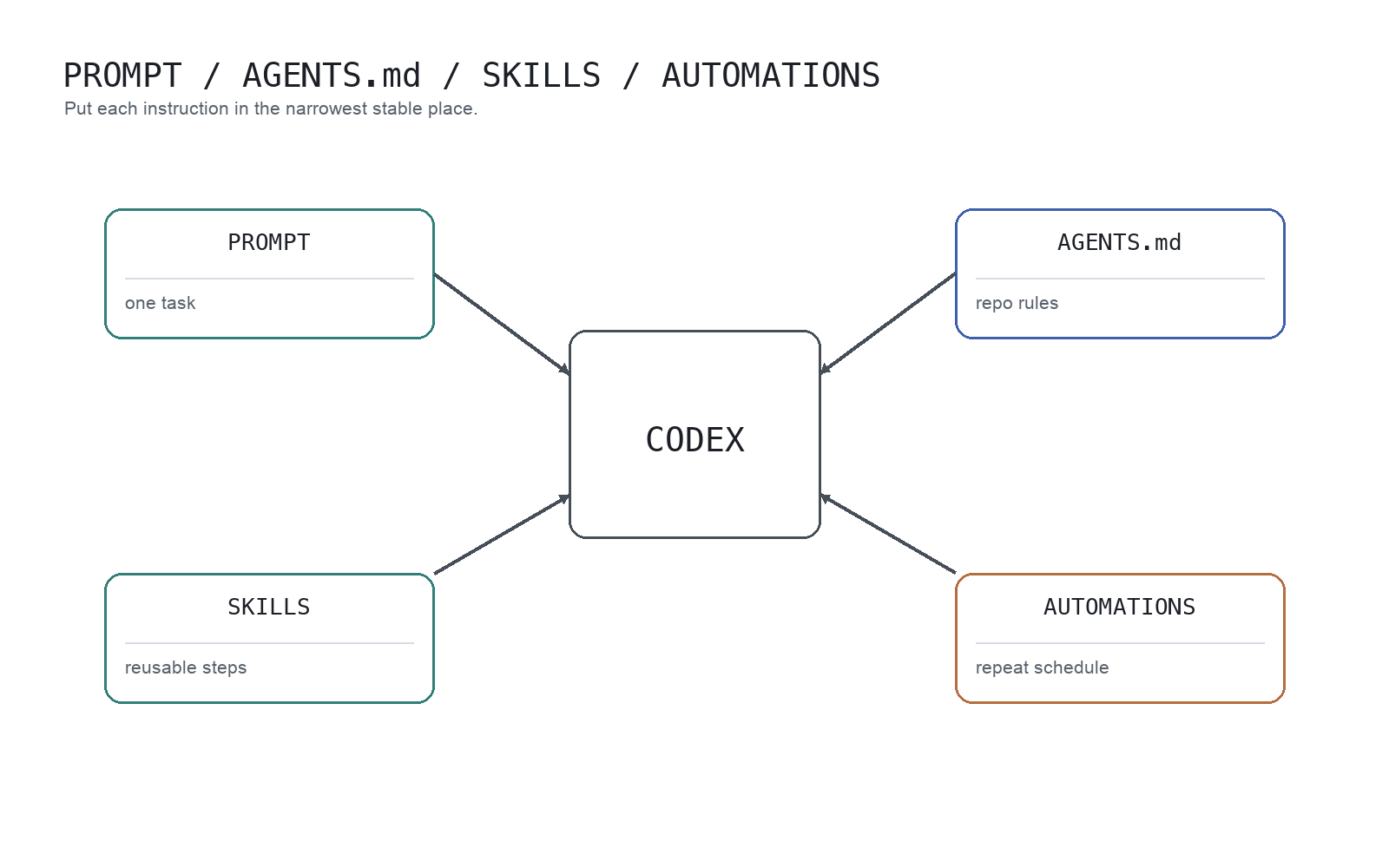
A clean split helps: per-task requests stay in prompts, long-lived repo rules live in AGENTS.md, repeatable procedures become skills, and recurring jobs move to automations.
Tip 4: use subagents for parallelizable work
Codex can use specialized subagents when you ask explicitly, then merge their output. This is useful in large repos because one main thread does not have to hold every review lens at once.
High-fit use cases:
- large-repo exploration
- multi-angle PR review
- option comparison
- multi-step planning
For PR review:
Compare this branch against main and run a review.
Delegate security, bugs, test flakiness, and maintainability to separate subagents.
Then return one consolidated summary.
This keeps one long reasoning chain from becoming overloaded. You separate exploration, validation, and synthesis.
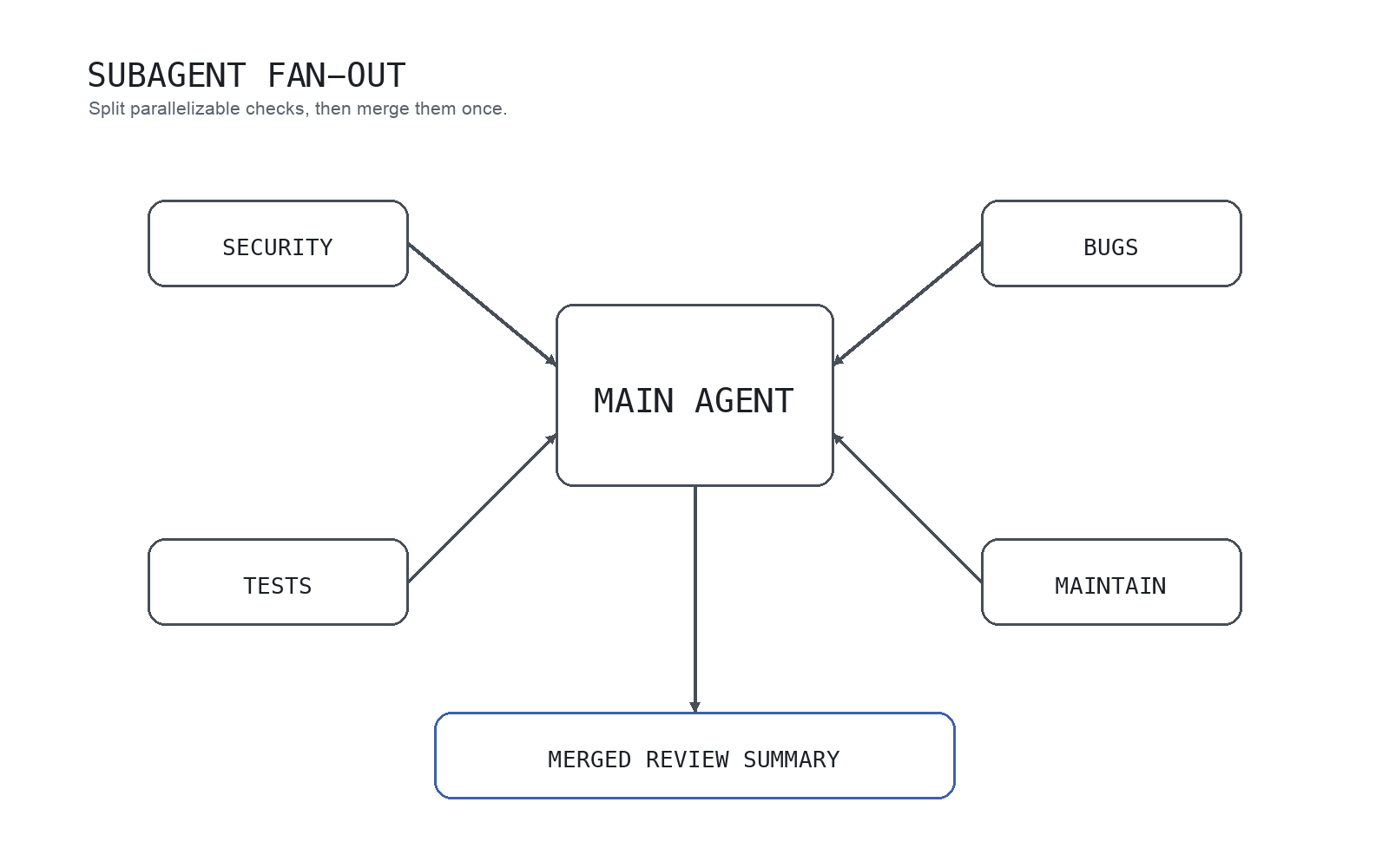
A good mental model is one coordinator agent distributing review lenses such as security, bugs, tests, and maintainability, then merging them into one actionable summary.
Caveats:
- subagents do not launch unless you request them
- each subagent can consume model/tool budget independently
- forcing parallelization on tightly coupled changes can increase merge cost
Parallelism is valuable when the work is actually separable.
Tip 5: always include review or tests after edits
Codex value compounds when changes are validated, not just generated.
Require at least one of:
- run relevant tests
- run
/reviewfor a second pass
Tip — automate the handoff, not the judgment. If Codex implements and Claude Code reviews, but you keep copying findings back into Codex by hand, looperators (opens in a new tab) can connect those real CLI sessions in a review loop. Set a bounded stop condition such as “until the review is clean, max 6 laps,” then open either session whenever you need to inspect or steer it. looperators is the orchestration layer; tests and human approval still decide whether the change ships.
For notebook-heavy work such as data analysis, feature engineering, modeling, or debugging a notebook, the main question is less "can Codex write notebook code?" than "what feedback loop is it optimizing for?" Generic code agents tend to assume software-developer signals like run/build/pass, while notebook work needs a more scientist-like loop grounded in notebook state, variables, DataFrames, and execution outputs. That is why notebook skills or MCP wiring alone often still feel incomplete. If that is your workflow, Jupyter AI RunCell for Notebook Debugging and Data Work is a useful companion read.
A short demo makes that difference more concrete:
App inline comments in the review pane make this feedback loop much faster.
Best practices
1. Ramp task size gradually
Do not start with broad implementation asks.
A practical progression:
- investigation only
- one-file edit
- small bug fix
- fix plus tests
- multi-file change
- subagents and automation
This progression exposes repo constraints before complexity spikes.
2. Start with stricter approvals and sandbox boundaries
Codex best practices recommend starting with safer defaults, then loosening controls only where needed. That reduces avoidable failure cost.
For shared or production-adjacent repos, keep human review and approvals in the loop.
3. Store durable rules in config, not repeated prompts
Long prompt rule blocks eventually hide the real task. Durable rules belong in AGENTS.md, repeated procedures in skills, and recurring jobs in automations.
Codex skills package reusable instructions around SKILL.md with references and optional scripts, which is ideal for repeatable review and publishing workflows.
Good skill candidates:
- release-note drafting
- SEO content refresh checks
- accessibility review
- API migration review
- notebook export verification
Weak skill candidates are one-off requests that only apply to the current task.
4. Use worktrees for concurrent threads on overlapping repos
If multiple threads run in one repo, worktree discipline reduces collisions. Codex App worktrees let you run parallel tasks without destabilizing your current local state.
Useful scenarios:
- bugfix in one thread, docs update in another
- run background tasks while keeping manual work active
- test an isolated task without contaminating main workspace
Without worktrees, parallel edits on overlapping files quickly become hard to review and merge.
One practical footnote for background tasks: if you start a long local Codex run and then step away from a MacBook, the run stops when the Mac sleeps — closing the lid is enough. Keeping Codex and Claude Code running with the lid closed covers the caffeinate and pmset side of that. Cloud tasks started from the Codex app are unaffected.
5. Curate changes instead of accepting them wholesale
Do not treat Codex output as auto-merge input. Use stage, revert, and inline comments to shape the patch.
The stable operating model is not autopilot. It is "fast draft partner plus verification partner."
Who should use Codex this way?
Beginners
Start with explanation and repair tasks before full generation:
- "What does this function do?"
- "What caused this error?"
- "Give me the smallest safe fix."
That pattern supports learning and shipping at the same time.
Solo developers
Codex fits solo workflows well because planning, editing, testing, and review can stay in one loop. Subagents are especially useful when you need parallel exploration and review views.
Teams
In teams, quality depends more on shared operating conventions than on individual prompt style. Prioritize AGENTS.md, review hygiene, worktree discipline, and reusable skills.
Who should not use Codex this way?
If your goal is to hand over vague requests and auto-accept everything, this workflow is a poor fit. Codex works best when you give clear intent, review diffs, and evolve rules over time.
FAQ
What are the best Codex tips?
Five, in priority order: ask for a plan before implementation; state scope and non-goals in every task; move durable repo rules into AGENTS.md instead of repeating them in prompts; delegate separable work such as multi-lens PR review to subagents; and always end a task with tests or /review. Each is expanded above.
How do I get started with Codex?
Run npm i -g @openai/codex then codex, and authenticate with your ChatGPT account or API key. Make the first prompt investigation-only ("summarize this repo, do not edit"), the second a single-file edit, and the third an edit plus verification. That three-prompt ramp exposes how Codex reads your repo before you trust it with anything broad.
Is Codex beginner-friendly?
Yes. Start with explanation, small fixes, and debugging support rather than large autonomous implementation.
Should I start with Codex CLI or App?
Choose CLI if you are terminal-centric. Choose App if you care most about diff visibility and parallel task management. If unsure, learn the core loop in CLI first.
How do I use Codex CLI in a large repo?
Start with an investigation-only prompt, ask Codex to map entrypoints and commands, then constrain edits to a small file set. Add AGENTS.md before asking for broad implementation.
What should go in AGENTS.md for Codex?
Put durable repository instructions there: build commands, lint/test order, package boundaries, style conventions, review expectations, and links to deeper docs. Keep one-off task details in the prompt.
When should I create a Codex skill?
Create a skill when the workflow repeats across tasks, such as release checks, docs refreshes, accessibility review, API migration review, or notebook export verification.
When should I use subagents?
Use them for work that can be split by lens, such as exploration, review, and option comparison. Do not force subagents onto tightly coupled single-thread edits.
How should I split AGENTS.md vs skills?
Use AGENTS.md for repo-wide rules and expectations. Use skills for repeatable task procedures. Think of AGENTS.md as a working agreement and skills as reusable playbooks.
Can I trust Codex changes without review?
No. Treat testing and diff review as required gates. Codex can move quickly, but final acceptance should stay human.
Related Guides
- Parallel Code Agents Explained
- Claude Code Bypass Permissions: Desktop Toggle, CLI Flags, and Error Fixes
- How to Make Mac Not Sleep: Keep Codex and Claude Code Running
- Codex vs Claude Code Skills
- Best Vibe Coding Tools in 2026
- Build a Claude-Code-Like AI Agent with Claude Agent SDK
- Runcell Science: An Open Source Alternative to Claude Science for Research Workflows