Parallel Code Agents Explained: Worktrees, Sandboxes, and Desktop Tool Patterns in 2026


Parallel code agents are multiple AI coding sessions running at the same time without overwriting each other's files, terminals, or branches.
In practice, that usually means one of two things: each agent gets its own local Git worktree (opens in a new tab), or each task runs inside its own cloud sandbox. As of July 21, 2026, most serious products in this category are converging on that same idea.
That matters because parallelism is not the hard part. Isolation is. If two agents can edit the same repo but you cannot review, replay, or merge their work safely, you do not have a scalable workflow. You have a faster way to create conflicts.
If you searched for a Codex desktop alternative, that usually means you are not just comparing brands. You are really comparing isolation models: local worktrees, IDE-native parallel agents, and cloud async sandboxes.
If you want more context around this space, start with the AI Coding topic hub, our practical tutorial on building a Claude-Code-style agent, and our stack-level comparison of OpenClaw vs ZeroClaw vs Pi Agent vs Nanobot.
- Runcell Science: An Open Source Alternative to Claude Science for Research Workflows
- How to Make Mac Not Sleep: Keep Codex, Claude Code, and AI Agents Running
- OpenClaw vs ZeroClaw vs Pi Agent vs Nanobot: Which AI Agent Stack Should You Choose in 2026?
- Can Claude Code Analyze Jupyter Notebooks for Data Science? What It Actually Does
- Claude Code Routines: Why AI Agent Cron Jobs Matter
- Claude Code Desktop Bypass Permissions: How to Enable It
- How to Build Two Python Agents with Google’s A2A Protocol - Step by Step Tutorial
- Top 10 growing data visualization libraries in Python in 2025
Quick answer
Use a desktop orchestrator if you want several local agents working in parallel and you care most about diff review, branch control, and terminal visibility.
Use an IDE-native parallel agent if you already live inside one editor and want parallel tasks without managing a separate control plane.
Use a cloud async coding agent if your main requirement is "start a task, close the window, come back later, and open a PR."
| If your real need is... | Best pattern | Why |
|---|---|---|
| Multiple local agents editing the same repo safely | Desktop orchestrator | Usually built around worktrees, diff review, and explicit merge flow |
| Multiple agents reviewing or debating until a condition is met | Loop-native orchestrator | Makes handoffs, feedback, and stopping rules part of the executable workflow |
| Parallel help inside one editor | IDE-native parallel agents | Lower friction if your editor is already the center of your workflow |
| Long-running background tasks with PR output | Cloud async agent | Better for autonomous execution and reconnectable state |
| Maximum control over your own stack | DIY runtime + worktree manager | Best when you want to assemble the workflow yourself |
What parallel code agents actually are
The simplest definition is this:
A parallel code agent system lets multiple AI workers explore, edit, test, and propose changes at the same time while keeping their state isolated enough to review safely.
That isolation can happen at several levels:
- separate threads or sessions
- separate Git worktrees or branches
- separate terminals and tool permissions
- separate cloud containers or VMs
This is why "parallel agents" and "multi-model" are not the same thing. You can have ten models talking in one shared directory and still create a mess. What makes a parallel agent workflow useful is the ability to inspect each unit of work separately and then merge only what survives review.
For more agent-stack coverage, browse the openclaw topic hub. If you want to explore neighboring technical topics, use the full topics index.
Why worktrees became the default local isolation layer
For desktop-first products, git worktree solves the most painful problem with local parallelism: file collisions.
Each worktree gives an agent its own checkout, branch, and working directory while still sharing the same Git object database underneath. That is a much better fit than duplicating an entire repository by hand.
The practical result is straightforward:
- agent A can refactor authentication in one worktree
- agent B can investigate flaky tests in another
- agent C can prototype a docs change in a third
No one has to fight over one node_modules-heavy folder, one active branch, or one terminal history.
This pattern is now common across local AI coding workflows because it keeps the isolation model obvious. Each agent gets a workspace. Each workspace produces a diff. Each diff can be reviewed, committed, or discarded.
The four product shapes you should understand
Before comparing tools, classify the product shape correctly.
1. Desktop orchestrators
This category treats the desktop app as a control plane for multiple local sessions.
The usual building blocks are:
- worktree creation
- per-session terminal binding
- diff review
- branch or PR actions
- session persistence
This is the right shape if your team wants to see several local tasks running at once and keep a human reviewer in the loop.
2. IDE-native parallel agents
This category embeds parallel execution directly inside the editor. The benefit is lower context switching. The trade-off is that the editor becomes responsible for more orchestration concerns.
This is attractive when the editor is already the center of your workflow, but it can become cramped if you need a stronger operations view across many concurrent tasks.
3. Cloud async coding agents
This category moves the isolation boundary into remote sandboxes. Instead of managing local worktrees, you submit tasks that run in cloud environments with reconnectable state and PR-oriented output.
This is the cleanest fit when the real job is asynchronous execution, not interactive local supervision.
4. Loop-native orchestrators
Parallelism and orchestration solve different problems. Worktrees or sandboxes stop agents from colliding. A loop decides how one agent's result should trigger another agent, how review findings return to the implementer, and what condition ends the process.
looperators (opens in a new tab) is an open-source example of this fourth shape. It places existing Claude Code, Codex, and Grok Build sessions on a canvas where the edges execute. Output moves downstream, conclusions can wake an upstream agent again, and a rule such as “until the review is clean, max 6 laps” stops the cycle. Each node remains a real local CLI session that you can open and steer mid-run.
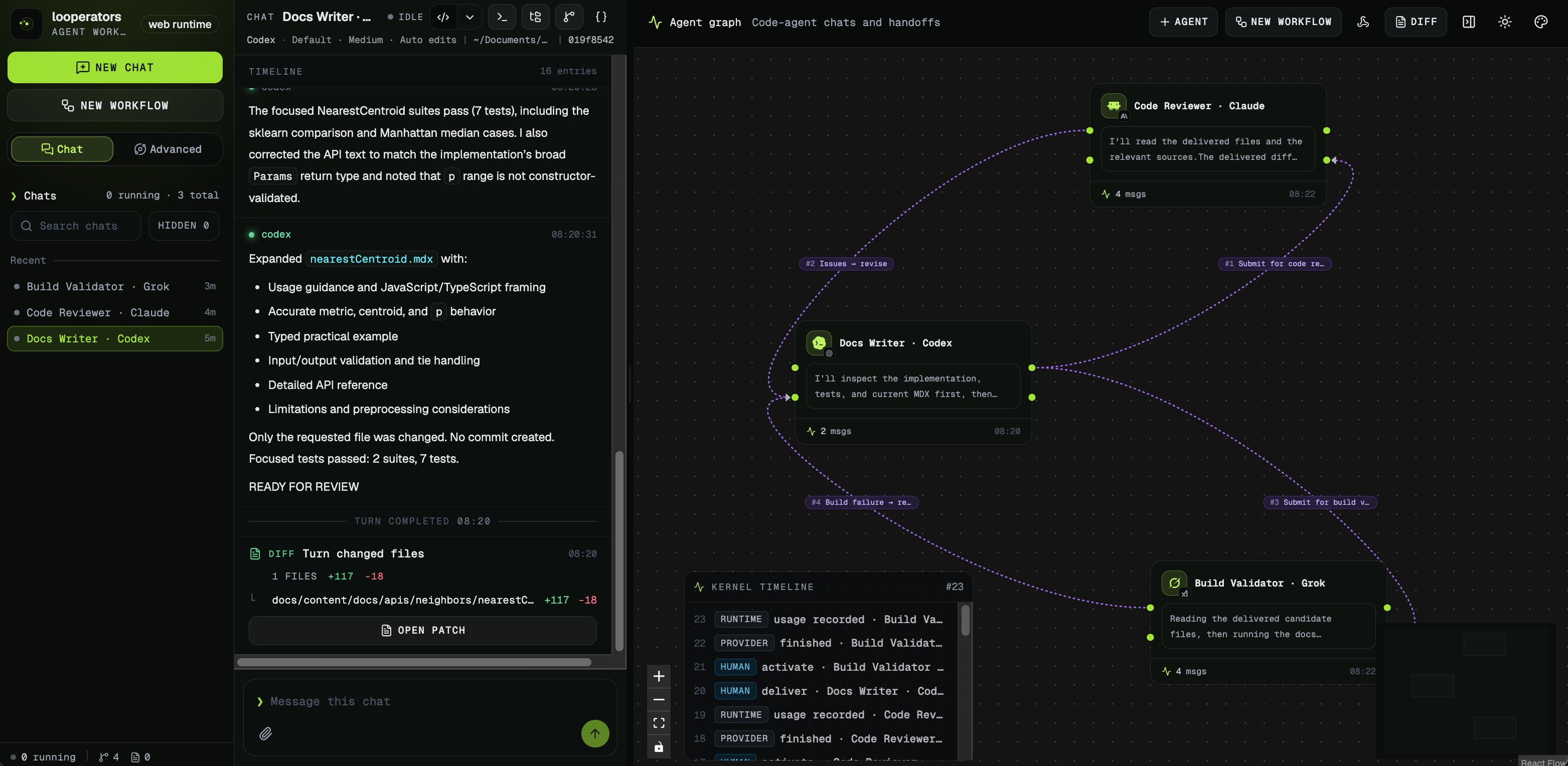
Isolation keeps concurrent work safe; this graph handles the separate coordination problem of implementation, review, validation, and feedback.
How today's major tools map to those patterns
As of July 21, 2026, the market is converging around a few recognizable shapes:
| Tool pattern | Representative tools | Isolation story | Best for |
|---|---|---|---|
| Desktop orchestrator | Codex app, Claude Code Desktop, Conductor, Superset, Panes | Usually local worktrees plus per-session terminals | Developers who want local control and reviewability |
| Loop-native orchestrator | looperators | Uses your real local agent sessions; orchestration is explicit, while repository isolation remains a separate design choice | Multi-agent review loops and multi-model discussions with stop conditions |
| IDE-native parallel agents | Cursor parallel agents, editor-integrated background agents | Worktrees or remote execution hidden behind the IDE | Teams that want one-editor workflows |
| Cloud async agent | GitHub Copilot coding agent, Jules, cloud Codex-style tasks | Per-task cloud sandbox or container | Long-running autonomous work with PR handoff |
The important part is not the brand list. The important part is the design trade:
- local desktop tools optimize for visibility
- loop-native tools optimize for handoffs and feedback
- IDE-native tools optimize for workflow convenience
- cloud async tools optimize for duration and autonomy
A practical worktree pattern you can adopt today
If you want parallel code agents on your own machine, start with one boring pattern before you reach for more automation.
This is the basic layout:
git worktree add ../repo-task-auth -b codex/task-auth
git worktree add ../repo-task-tests -b codex/task-tests
git worktree add ../repo-task-docs -b codex/task-docs
Each directory now becomes one agent's workspace.
A simple team rule makes this manageable:
- One task per worktree.
- One terminal per worktree.
- One reviewer decides whether the diff gets merged, split, or discarded.
That discipline matters more than the specific UI. Fancy orchestration software is mostly packaging around those same primitives.
Common traps
1. Confusing parallelism with productivity
More agents only help when the tasks are separable.
If three agents are all touching the same service boundary, database schema, and test suite, you are increasing merge cost as fast as you increase throughput.
2. Ignoring environment drift
Local worktrees are isolated from each other, but your setup scripts, environment variables, ports, and build caches may not be.
If your workflow depends on special .env files, background services, or seeded databases, you need a reproducible setup step for every parallel workspace.
3. Treating diff review as optional
Parallel agent workflows only stay trustworthy when review is first-class.
If your system makes it easy to spawn ten agents but hard to compare their output, you are optimizing the wrong step.
4. Choosing a cloud agent when you really need interactive supervision
Cloud async agents are excellent for long-running tasks, but they are not always the best fit for rapid local iteration. If you need to watch logs, rerun tests, inspect files, and steer constantly, a local orchestrator is usually the better choice.
5. Confusing parallel execution with collaboration
Launching three agents does not make them a team. If you still copy one agent's output into another chat, decide when to request a second review, and manually stop the cycle, you remain the workflow engine. Use explicit handoffs and stop conditions when the value comes from agents reacting to each other rather than merely running at the same time.
Which tool pattern should you choose?
Choose a desktop orchestrator when:
- you want several local agents on one repo
- you care about worktree hygiene and merge review
- you want to see terminals, diffs, and branches clearly
Choose an IDE-native parallel agent when:
- your editor is already your main control surface
- you want less tool switching
- you accept tighter coupling to one IDE
Choose a cloud async agent when:
- the task should keep running after you disconnect
- PR creation matters more than local interactivity
- you want stronger remote isolation than a laptop can provide
Choose a loop-native orchestrator when:
- one agent should implement while another reviews or challenges the result
- feedback should return automatically until a stated condition is met
- you want to keep using your existing agent CLIs and interrupt any session mid-run
Choose a DIY runtime and worktree manager when:
- you need full control over permissions and orchestration
- you are building internal tooling, not just consuming a product
- you are comfortable owning the workflow plumbing
FAQ
What is a parallel code agent?
A parallel code agent is one of several AI coding sessions running at the same time with isolated state, usually through separate worktrees or cloud sandboxes, so their changes can be reviewed safely.
Why do so many tools use Git worktrees?
Because worktrees let each agent have its own checkout and branch without duplicating the whole repository. That reduces collisions while keeping Git review workflows intact.
Are parallel code agents only for desktop apps?
No. Desktop apps often use worktrees locally, but cloud async agents use remote sandboxes for the same reason: isolate work, preserve state, and make the result reviewable.
When is a cloud coding agent better than a local worktree setup?
A cloud agent is usually better when the task should run unattended for a long time, survive disconnects, and hand back a PR or structured result later.
What is the biggest mistake teams make with parallel agents?
They treat every task as parallelizable. The real bottleneck is often shared architecture or review capacity, not the number of agents you can launch.
What is the best Codex desktop alternative?
There is no single best Codex desktop alternative for every team. Claude Code Desktop, Cursor, and other desktop orchestrators fit different workflows depending on whether you prioritize local worktrees, IDE-native editing, or cloud-style autonomy.
When do I need an agent loop instead of more parallel agents?
Use an agent loop when the next step depends on another agent's result—for example, Codex implements, Claude Code reviews, and the review returns to Codex until it is clean. Parallel agents are enough when tasks are independent and only need isolated workspaces.
Related Guides
- AI Coding Topic Hub
- Best AI Coding Tools in 2026
- Build a Claude-Code-Like AI Agent with Claude Agent SDK (TypeScript)
- OpenClaw vs ZeroClaw vs Pi Agent vs Nanobot
- OpenClaw Topic Hub
- All Topics